The best format for coloring pages is not the one with the longest feature list. It is the one that lets a person do the job with the fewest awkward steps. In real use, that job may be very small: open one page on a phone, print it without resizing problems, save a finished version, or come back to the same file a week later without searching through downloads, photos, or half-finished browser tabs. When that path is clear, the format feels invisible. When it is not, even a good coloring page starts to feel like work.
That is why format choice matters more than many publishers assume. Families do not think in technical terms like raster, document container, or browser storage. They notice practical things: whether the page opens fast, whether it prints neatly, whether it is easy to find again, and whether a child loses progress after closing the screen. PDF, JPG, and browser coloring each remove a different kind of friction, but they do not remove the same friction at the same point in the journey.
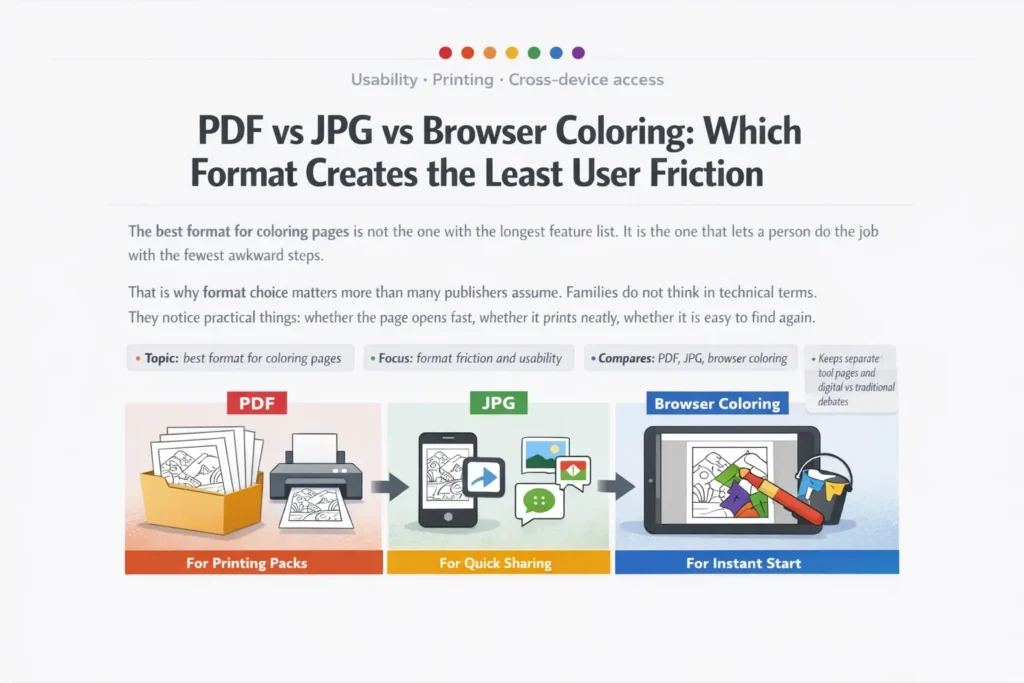
Focus: format friction and usability
Compares: PDF, JPG, browser coloring
Keeps separate: tool pages and digital vs traditional debates
Why format choice changes the whole user experience
Users do not judge a format in theory. They judge it in the middle of a task.
A parent standing near a printer notices whether the page comes out at the right size. A teacher notices whether ten copies stay consistent. A child on a tablet notices whether they can begin immediately. A grandparent notices whether the page opens from a message without extra confusion. These are not edge cases. They are the normal, everyday moments that decide whether a coloring page feels easy or annoying.
For coloring content, the biggest pain points are usually practical rather than technical. One user wants a single image they can save to Photos and send to another device. Another wants a multi-page set that stays in the right order and prints cleanly every time. Another wants to test an online coloring mode for two minutes and then move on. All three users may like the same artwork, but they are not asking the format to do the same job.
That is why PDF, JPG, and browser coloring should not be treated as interchangeable. PDF usually reduces print and return friction. JPG usually reduces preview and sharing friction. Browser coloring usually reduces first-start friction. The mistake is assuming that the format that feels easiest in the first ten seconds will also feel easiest after printing, saving, exporting, or reopening.
The quick verdict at a glance
| Format | Lowest-friction strength | Most common friction | Best fit |
|---|---|---|---|
| Stable page layout, repeatable printing, easier long-term storage for packs | Feels heavier on phones, adds a file/open step, less instant for quick one-page use | Printable packs, school use, reprints, structured home archives | |
| JPG | Fast visual access, familiar image behavior, simple saving and sharing | Less predictable print output, weaker for line-art preservation after repeated saves, messy for collections | Single sheets, phone-first access, message sharing, quick previews |
| Browser coloring | No download barrier, immediate start, natural fit for touch devices | Unclear save/export logic, return-session uncertainty, device-bound progress confusion | Instant starts, short sessions, trial use, low-commitment coloring |
None of these formats wins every step. Each one removes friction in a different place.
PDF: the format with the least friction once printing matters
PDF usually becomes the strongest option the moment a coloring page is expected to behave like a proper page rather than like a loose image. If the user wants the sheet to print at the intended proportions, keep margins under control, and come out the same way next time, PDF removes a lot of uncertainty. That matters with coloring pages because small layout shifts can make narrow spaces harder to color, squeeze details toward the edge, or turn a clean printable pack into an inconsistent set of pages.
PDF also helps when the page is meant to live longer than one quick session. A parent can keep one animal pack, one holiday pack, one quiet-time pack, and know that each set stays intact. A teacher can reopen the same file next month and print more copies without rebuilding a folder from scattered images. In other words, PDF reduces return friction: the effort of coming back and using the same material again without extra cleanup.
The strength of PDF is not that it feels magical. It is that it behaves predictably. That predictability becomes more valuable every time the user prints again, shares the file with another adult, or stores it for later. What feels slightly heavier at the first tap often feels much lighter by the third or fourth use.
Home printing, classroom sets, seasonal packs, repeat reprints, and situations where users want one dependable file instead of many separate images.
On mobile, it can feel like “one extra thing to manage.” Users may need to download the file, switch apps, or remember where it went. For someone who only wanted one fast page, that extra document step can make the experience feel slower than it really is.
In plain terms, PDF rarely wins the race to the first tap. It often wins the longer race: print today, print again later, and still know exactly where the file is.
JPG: low-friction for quick access, higher friction for print control
JPG works best when a coloring page needs to act like a normal image. That sounds simple, but it matters. Images feel native to modern device habits. People preview them quickly, save them to a gallery, send them in messages, and reopen them without thinking about folders, page order, or document viewers. For a single coloring sheet, that familiarity is a real advantage.
This is why JPG often wins the “I just need one page right now” scenario. A parent can open a page on a phone, save it to Photos, forward it to another adult, or pull it up again later from the image roll. For light, one-off use, this can feel smoother than PDF simply because it matches everyday phone behavior.
But JPG becomes less comfortable once the user expects the page to behave like a printable worksheet. It is an image format, not a page-oriented container. That means printing can depend more heavily on the device, gallery app, browser, or print menu the user happens to use. People may print from a zoomed screen state, crop unintentionally, or end up with slight scale shifts that they did not expect. On top of that, JPG is based on lossy compression. That is good for lightweight files, but it is not ideal for clean black outlines if the file has been resaved, compressed by another app, or passed through messaging platforms.
The practical rule is straightforward: JPG is strongest when the page is treated like a quick image asset, not like a reusable printable document. As soon as the user expects order, reprints, or reliable paper output, JPG starts to lose some of the simplicity that made it appealing in the first place.
Browser coloring: the easiest start, but not always the easiest finish
Browser coloring removes the step that many casual users dislike most: downloading something before they even know whether they want it. That is why it can feel instantly inviting, especially on tablets and phones. A child taps, the page opens, and the activity begins. For low-commitment use, that is a major strength. It turns curiosity into action quickly.
The problem is that browser coloring often moves friction further down the path instead of removing it altogether. The beginning is smooth, but the questions arrive later. Did the page save automatically? Is the progress attached to this device only? What happens if the tab closes? Can the finished image be printed without exporting first? Will the child find it again tomorrow? If the interface does not answer those questions clearly, the experience can flip from easy to fragile.
This is where browser coloring differs from both PDF and JPG. It is excellent at reducing entry friction. It is less reliable when users assume that “what I see in the browser” automatically behaves like “a file I now own.” Those are not the same thing, and many families do not realize the difference until the session is over.
The goal is to begin immediately, the session is short, and save or export actions are obvious enough that users understand what is temporary and what is permanent.
Users expect progress to survive tab closing, private browsing, storage clearing, device changes, or vague save flows. In those moments, “no download needed” can quickly turn into “we thought it was saved.”
So browser coloring creates the least friction in one very specific zone: start-now use on touch devices, before printing, archiving, or cross-device access become important. It is often the easiest way to begin, but not automatically the easiest way to keep, export, or revisit the result.
The real friction test: open, print, save, return
The clearest comparison is not by feature list but by user journey.
Browser coloring often wins because there is nothing extra to fetch or manage before the activity starts. JPG comes close because images feel native on phones and slip easily into familiar behaviors like saving or sharing. PDF is fully usable here, but it often adds just enough “document handling” to feel heavier for one quick page.
PDF usually wins because the user is working with a page-first file from the beginning. JPG can print well, but the result depends more on the app and path used to print it. Browser coloring only feels easy at this stage if export and print steps are extremely obvious and the user understands that printing from the live browser view may not be the same as printing a finished saved file.
PDF is the easiest to keep as a named pack or worksheet. JPG is easy to save, but easy to lose inside a crowded photo roll. Browser coloring needs a clear handoff from session to file; without that, users can mistake temporary progress for permanent storage.
PDF creates the least return friction in most repeat-use cases. JPG still works for a single sheet, but it becomes weaker as soon as the user is managing many pages. Browser coloring depends almost entirely on whether the user exported the result properly or assumed the browser would remember everything on its own.
Which format creates the least friction on different devices
Device context matters because it changes what “easy” means. A format that feels perfect on a laptop beside a printer may feel clumsy on a phone in the back seat of a car.
| Device situation | Lowest-friction choice | Why it feels easier | Watch-out point |
|---|---|---|---|
| Phone, one quick page | JPG or browser coloring | Fast visual access, low mental overhead, no “document workflow” feeling | Printing later may require extra steps or clearer export than users expect |
| Tablet, child starts immediately | Browser coloring | Direct touch interaction and no download barrier before the activity begins | Users need a very clear explanation of how progress and finished work are saved |
| Laptop + printer nearby | Stable page handling, reliable print path, easier repeat printing | Can feel slower if the user only wanted one page for instant viewing | |
| Teacher or parent storing sets | One organized file, easier reuse, less folder mess over time | Single-image convenience is lower than with a fast JPG preview |
So what is the best format for coloring pages?
There is no honest one-size-fits-all answer, because users are not solving one problem. They are solving different problems at different moments.
- For printing, reprinting, and keeping packs organized, PDF is usually the strongest choice. It reduces uncertainty later, which is exactly what repeat users care about.
- For one fast page on a phone, JPG often feels easiest. It behaves like an image, and that matches the way many people already move through their devices.
- For instant engagement, browser coloring has the lightest first step. But it keeps that advantage only when save, export, and return paths are obvious.
A smart coloring-page ecosystem does not try to make one format do every job. It lets each format handle the task it handles naturally. PDF is best when the user is thinking about paper, reuse, and order. JPG is best when the user wants one simple visual asset. Browser coloring is best when the user wants to begin right away with minimal commitment.
That is the real conclusion behind the phrase best format for coloring pages: the best format is the one that removes friction at the point where the user is most likely to quit.
FAQ
Is PDF always the best format for coloring pages?
No. PDF is usually the safest option when printing and repeat use matter, but it is not always the smoothest choice for quick phone-based access. A single sheet viewed once on mobile may feel easier as a JPG or in a browser tool.
Why do some parents still prefer JPG even when PDF prints more reliably?
Because JPG matches familiar device habits. It opens like a normal image, saves to the gallery, and can be shared quickly in messages. That convenience is often more important in the moment than perfect print predictability.
What is the biggest usability risk in browser coloring?
The biggest risk is false confidence around saving. Users often assume that visible progress in a browser automatically means permanent storage. If save and export rules are not explicit, they may lose work after closing the tab or switching devices.
Which format is better for sharp black outlines and printable line art?
In most printable workflows, PDF is the safer choice because it preserves the page as a document. JPG can still look good, but it is more vulnerable to compression, re-saving, and app-specific printing behavior, especially when the art relies on crisp outlines.
What format works best for a printable pack rather than one page?
PDF is usually the clear winner for packs. It keeps pages together, maintains order, and is easier to store and reprint later. JPG is much better suited to single-page access than to grouped printable sets.
What is the lowest-friction setup for a site that serves different kinds of users?
Offer more than one path. Browser coloring helps users start instantly, JPG supports fast single-page access, and PDF covers print-focused users who want reliable output and easier long-term reuse.